

Introduction
Tumbleweed is a two-player abstract board game designed in 2020 by Mike Zapawa. It has since received a small following of players, mostly from the Go community, which can be found in Discord server. There are multiple websites where you can play Tumbleweed against another player or a bot(1 2 3 4). There is also a guide that explains some strategy.
Aim of the game
Tumbleweed is played on a hexagonal grid by two players: Red and White. Players alternate placing stacks of their colour in a cell, with the goal of claiming the most cells at the end of the game. A stack can see another stack when they are connected by a straight line without stacks in between. When a player places a stack, its value is determined by how many other stacks of their colour it sees. New stacks must see at least one friendly stack. A player can capture an opponent stack or upgrade a friendly stack if the new value is strictly greater than the stack’s current value. We forbid moves where the opponent can immediately (re-)capture the last played stack. This means that your move must see at least as many friendly stacks as opponent stacks.
Setup
For CodeCup we will use a hexagonal grid with 6 hexagons on each side.
We will label the cells with a letter and a number.
The columns, which run north-east to south-west (like/), are labelled A to K.
The rows, which run west to east, are numbered from 1 to 11.
Initially the board will have three stacks:
- A neutral stack with value 2 in the center of the board (cell
F6) - A red stack with value 1
- A white stack with value 1
The judging software guarantees that no stack in the initial position is on the border or right next to the opponent stack.
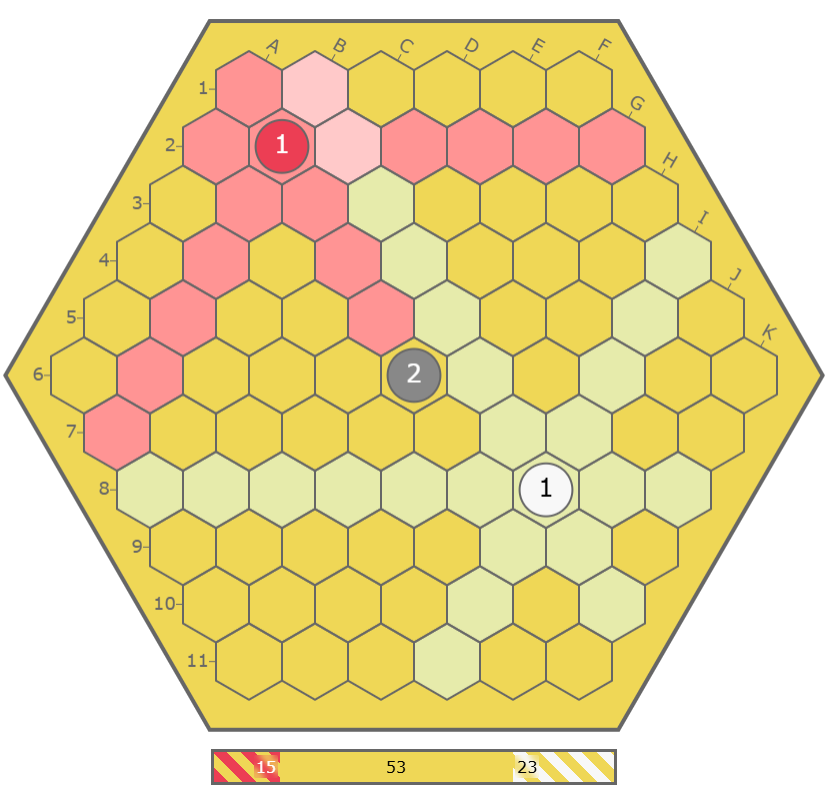
Figure 1: a possible initial board
Protocol
Your program must follow the following protocol when communicating with the judging software. Your player must read information from standard input, and output its requested response to standard output. For more information, see the Technical rules. Do not forget to end your moves with a newline and flush your output!
At the start of the game, the red player receives three lines of input.
The first line contains the position of the initial red stack.
The second line the position of the initial white stack.
The third line will read “Start” indicating that they should play first.
The red player should then print the position of the stack they want to place to standard output.
The value will be determined by the judging software.
Next the white player receives three lines as well.
The positions of the initial red and white stack, and the position of the first move by red.
They should also respond with their first move.
From that point on both players alternate reading in the move from their opponent and printing their response.
If at any point during the game a player receives “Quit” instead of a move, they should terminate their program.
In particular, the referee will send “Quit” when the game is finished (see End of the game).
The initial positions and the moves are each indicated by two parts: a capital letter for the column and a number for the row.
For example, the neutral stone would be in position F6
Below is an example of the communication protocol with the first and last moves of the corresponding to the example game. An interactive version can be found here.
| Red | White | ||
|---|---|---|---|
| Input | Output | Input | Output |
| B2 | B2 | ||
| I8 | I8 | ||
| Start | E5 | ||
| E5 | H7 | ||
| H7 | B4 | ||
| B4 | D3 | ||
| D3 | G4 | ||
| G4 | F7 | ||
| ... | ... | ... | ... |
| D3 | C3 | ||
| C3 | F3 | ||
| Quit | Quit | ||
End of the game
After each move, the judging software runs two simulations to determine how much territory each player has.
To determine the territory for red, the judging software first plays all available moves for white until there are no white moves left.
Then it plays all available moves for red to fill the board and capture dead white stacks.
The cells with red stacks after this simulation belong to reds territory.
The calculation of white territory is done symmetrically.
If every cell is part of either red or white territory, the judging software will end the game.
Both players will receive “Quit” in their input and should terminate.
This procedure guarantees that players always have a valid move available.
When a player plays an invalid move, for example playing outside the board or in a cell that cannot see a friendly stack, the game ends immediately.
Both players will be send a “Quit”.
If a player exceeds their time limit of 30 seconds, they will be terminated immediately.
Only the other player will receive a “Quit”.
Scoring
Each player will receive a point for every cell of their territory.
Furthermore, the player with the most cells gets a 200 point winning bonus and the losing player a 100 point bonus.
A player that made an invalid move or ran out of time receives no points.
Their opponent wins by default, and their score is computed as follows:
200 + winner territory + 0.9 * neutral area (rounded down).
The neutral area is the area that does not belong to either player's territory.
Visualisation
In the visualisation of a game, we show different bits of information. First of all we show the hexagonal grid with the labels along the outside. In this grid you can see the placed stacks with their values. The last move is shown by a black outline of the cell. The background colour of the cells are an indicator of who can play in that cell. Here we use pink to indicate that both red and white are able to play in that cell. The background of a stack that is not under threat of capture is the same as the colour of the stack. Towards the end of the game each player starts to complete territory. This is indicated by a red or white border around a players territory.
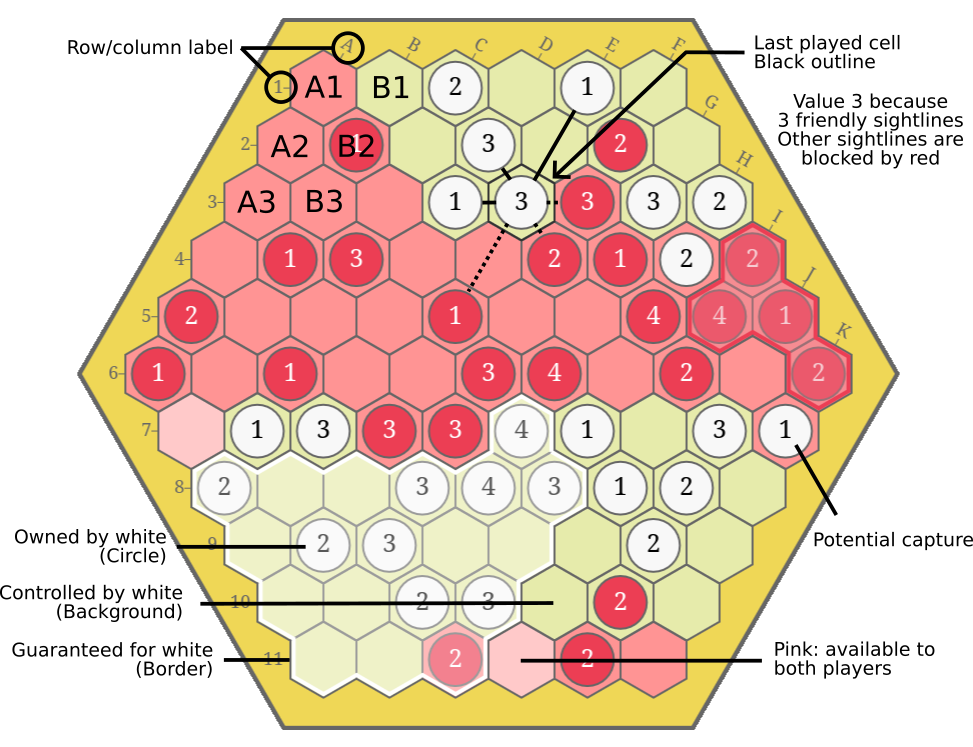
Figure 2: a board position in the middle of a game with explanation of different elements
Below the board is a score bar that consists of multiple segments. The striped segments indicate how many cells only one of the players can play in (i.e. cells with a red or white background). Near the end of the game there are also filled in segments indicating each players territory.
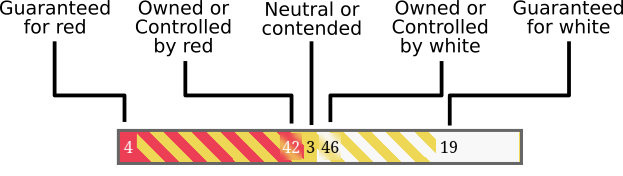
Figure 3: Explanation of the score bar
Differences with official rules
The official rules determine the starting position by a pie-offer-protocol. One player sets up an initial position and the other player decides to play as red or white. In the CodeCup the judging software determines the starting position.
Another change is when the game ends. In the official rules, the game ends when both players pass. The problem with this is that the judging software cannot determine the score for all boards, which is necessary for a clear outcome. Since the judging software cannot always determine the score when this happens, we have replaced when the game ends with the judging software deciding based on two simulations.
Finally, the official rules allow for suicidal moves, moves that can immediately be recaptured by the opponent. It can be proven that suicidal moves are never beneficial. We have changed the placement rules to prohibit suicidal moves. By disallowing suicidal moves we can end the game earlier.